
Claude Account Suspended? A VPS Might Be the Answer
Short version: A lot of people make Claude account stability sound harder than it is. My setup is pretty plain: keep Claude, code, browser sessions, and dev tools on one stable VPS, and let my local devices connect to it through Tailscale, SSH, or RDP.
TL;DR
| Problem | My approach |
|---|---|
| Too many devices and networks | Use one VPS as the fixed Claude work environment |
| Too much proxy-chain complexity | Use SSH-only if possible; add a lightweight Ubuntu desktop only if needed |
| Need the same setup across devices | Join everything with Tailscale |
| Need Claude Code, GUI tools, or a browser | Install them on the VPS, not every local machine |
| Account-safety anxiety | Reduce environment drift; do not claim immunity |
I won't pretend this guarantees you'll never get suspended — no account setup honestly can. What it helps with is more mundane: your Claude usage stops looking like a pile of random throwaway sessions.
1. Most setups are overcomplicated
Discussions about Claude stability tend to spiral into exit chains, browser fingerprints, automation tricks, and "look more human" folklore.
I've come to think that whole framing usually leads people astray.
If what you actually want is:
- stable Claude-assisted coding;
- the same environment from multiple devices;
- no repeated Node/Python/Docker/key setup on every laptop;
- less switching between home network, office network, phone hotspot, and random exits;
- less false-positive risk from an environment that keeps changing;
then the simplest answer is a capable VPS you treat as your remote workstation.
Your laptop stops being the real work environment. It just becomes the thing you connect in with — Mac, Windows, or iPad, they all land in the same place.
2. Pick a VPS that can actually be a workstation
For a small website, a tiny VPS is fine. But if you want it to be your Claude / dev / remote-desktop machine, don't starve it.
My baseline:
- CPU: 2 vCPU minimum; 4 vCPU feels better.
- RAM: 2-4GB for SSH-only; 4-8GB for a lightweight desktop.
- Disk: 40GB minimum; 80GB+ if you keep projects, browser cache, and Docker images there.
- OS: Ubuntu 22.04 or 24.04 LTS.
- Region: pick one place you can use consistently, and stop moving.
- Provider: avoid suspiciously dirty IP pools or machines you have to replace constantly.
You're not buying it for an extra IP. You're buying a development seat you don't have to rebuild every time.
3. Two modes: SSH-only or lightweight desktop
Mode A: SSH-only
This is the simplest and cleanest mode.
sudo apt update
sudo apt install -y git curl vim tmux htop ufw
Then install whatever you actually need:
- Node.js / pnpm / npm
- Python / uv / pipx
- Docker / Docker Compose
- Claude Code or your CLI tools
- GitHub CLI
Daily use becomes:
ssh your-vps
tmux new -s work
Code, logs, scripts, and deployments all live on the same stable machine. No desktop, no browser layer to maintain, and a smaller attack surface — all you really need is stable SSH and one set of keys.
Mode B: lightweight Ubuntu desktop
If you need a GUI, a browser, cc gui, or desktop-only tools, install a light desktop.
sudo apt update
sudo apt install -y xfce4 xfce4-goodies xrdp
sudo systemctl enable --now xrdp
Then connect through RDP. Don't reach for a heavy desktop environment on day one — XFCE isn't glamorous, but it's light and predictable, and it recovers cleanly.
4. Tailscale makes the setup comfortable
Install Tailscale on the VPS and your local devices:
curl -fsSL https://tailscale.com/install.sh | sh
sudo tailscale up
Then:
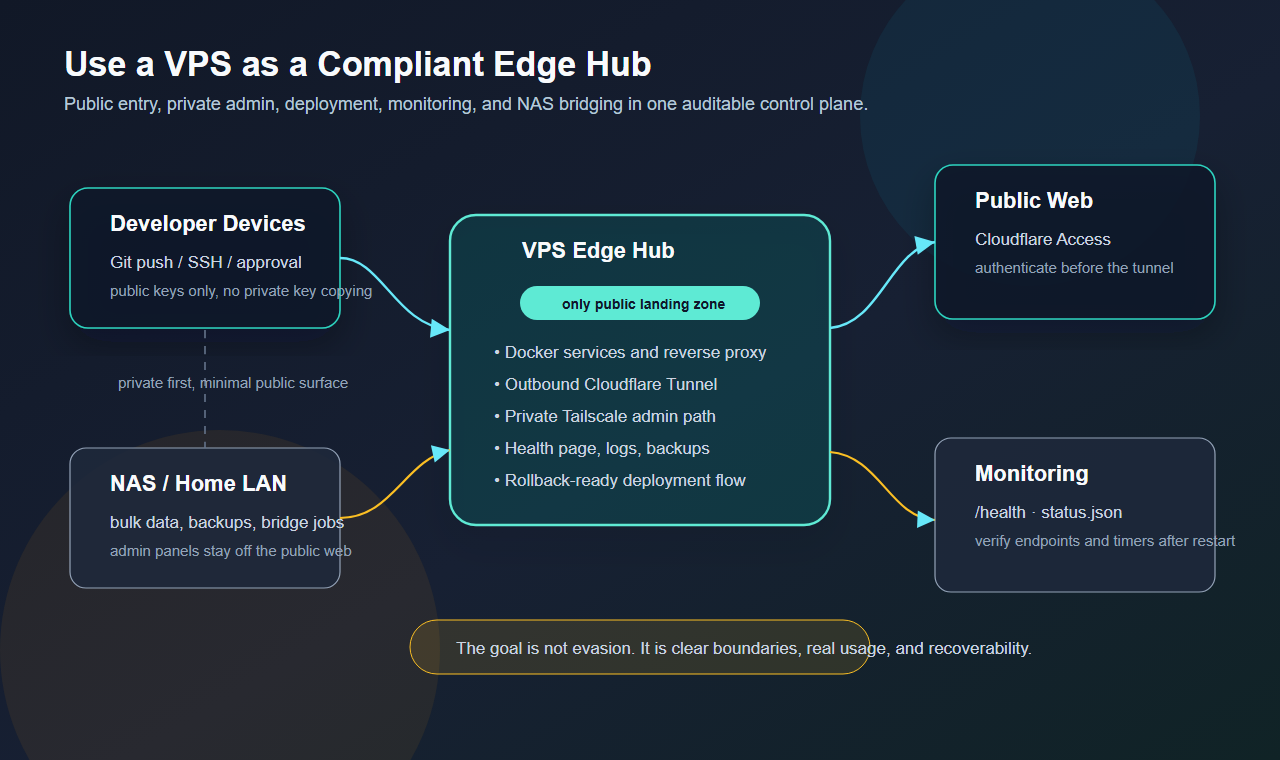
- SSH through the Tailscale IP.
- Keep RDP private; don't expose it to the public internet.
- Put admin panels, internal health pages, and private services on the tailnet.
- Connect from laptop, desktop, phone, or tablet into the same work machine.
So every device on your desk is basically a remote control, while the real Claude/browser/dev environment stays put on the VPS.
5. Do not skip basic hardening
Create a normal user instead of living as root:
sudo adduser work
sudo usermod -aG sudo work
Use one SSH keypair per device:
new machine private key stays on the new machine
new machine public key -> VPS ~/.ssh/authorized_keys
Don't copy one old private key onto every machine — lose it once and you lose everything.
Lock down the firewall:
sudo ufw default deny incoming
sudo ufw default allow outgoing
sudo ufw allow OpenSSH
sudo ufw enable
If RDP only needs to work over Tailscale, keep it private and open as few ports as you can.
6. Deployment should still be boring
Even though the main point here is the workstation, it's worth keeping your VPS deployments repeatable with a fixed runbook.
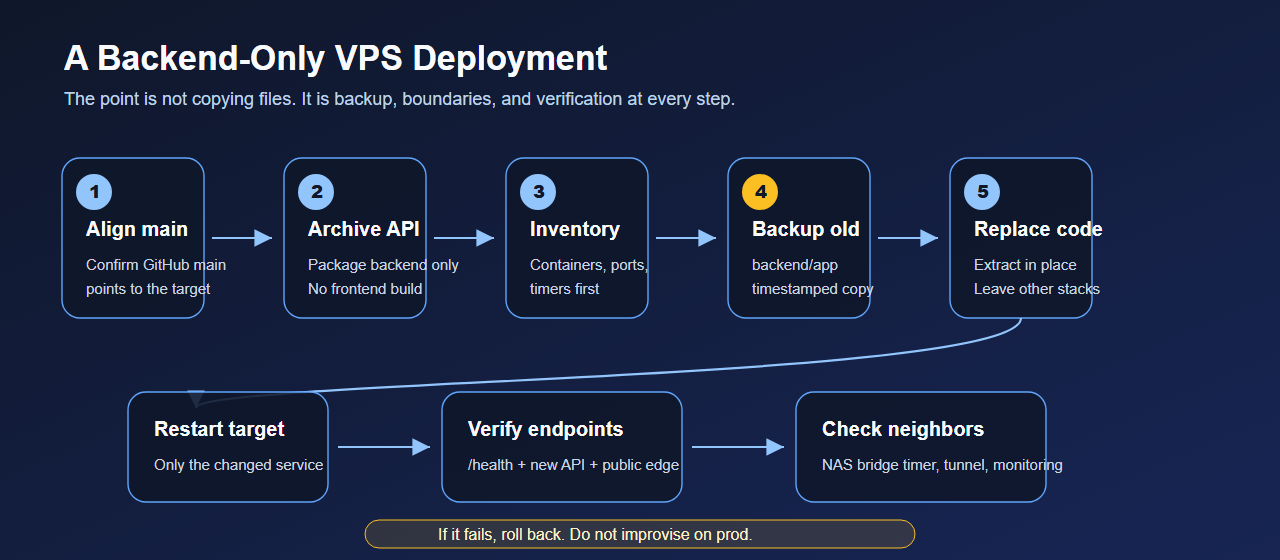
Basic order:
- Align the Git branch.
- Update only the target directory.
- Back up before replacing.
- Restart the target service.
- Verify
/health, logs, and key endpoints. - Keep rollback possible.
Claude can help read logs and draft scripts, but production shouldn't ride on improvisation. The more fixed your process is, the more useful the AI gets; the messier it is, the more the AI just amplifies the mess.
7. About account safety
People always want to ask: does this completely prevent suspension?
It doesn't, and saying otherwise wouldn't be honest.
Accounts are affected by Usage Policy, Terms, supported locations, payment, abuse detection, and plain false positives. No VPS setup buys you immunity.
What it can reduce is one common risk: environment drift.
You stop hopping between networks, devices, proxy chains, and scripts, and your Claude workflow lands in one auditable place with logs, key boundaries, backups, and a recovery path. That's not gaming the system — it's ordinary engineering hygiene.
8. Checklist
- Buy a VPS with enough RAM.
- Install Ubuntu LTS.
- Create a normal user; do not live as root.
- Use one SSH keypair per device.
- Install Tailscale.
- Get SSH working first.
- Add XFCE + xrdp only if you need a GUI.
- Keep RDP on Tailscale, not the public internet.
- Install Claude Code / cc gui / browser / dev tools on the VPS.
- Write deployment runbooks with backup, verification, and rollback.
9. Final thought
Don't turn Claude environment stability into folklore.
Most of the time you don't need cleverer evasion tricks. You need one clean, fixed machine you can reconnect to and rebuild when it breaks.
VPS + Tailscale + SSH/RDP is boring. That's exactly why it holds up.