
Build Your Own Multi-Model AI Gateway in a Day: Turn Paid Subscriptions into a Family-Wide Hub
Intro
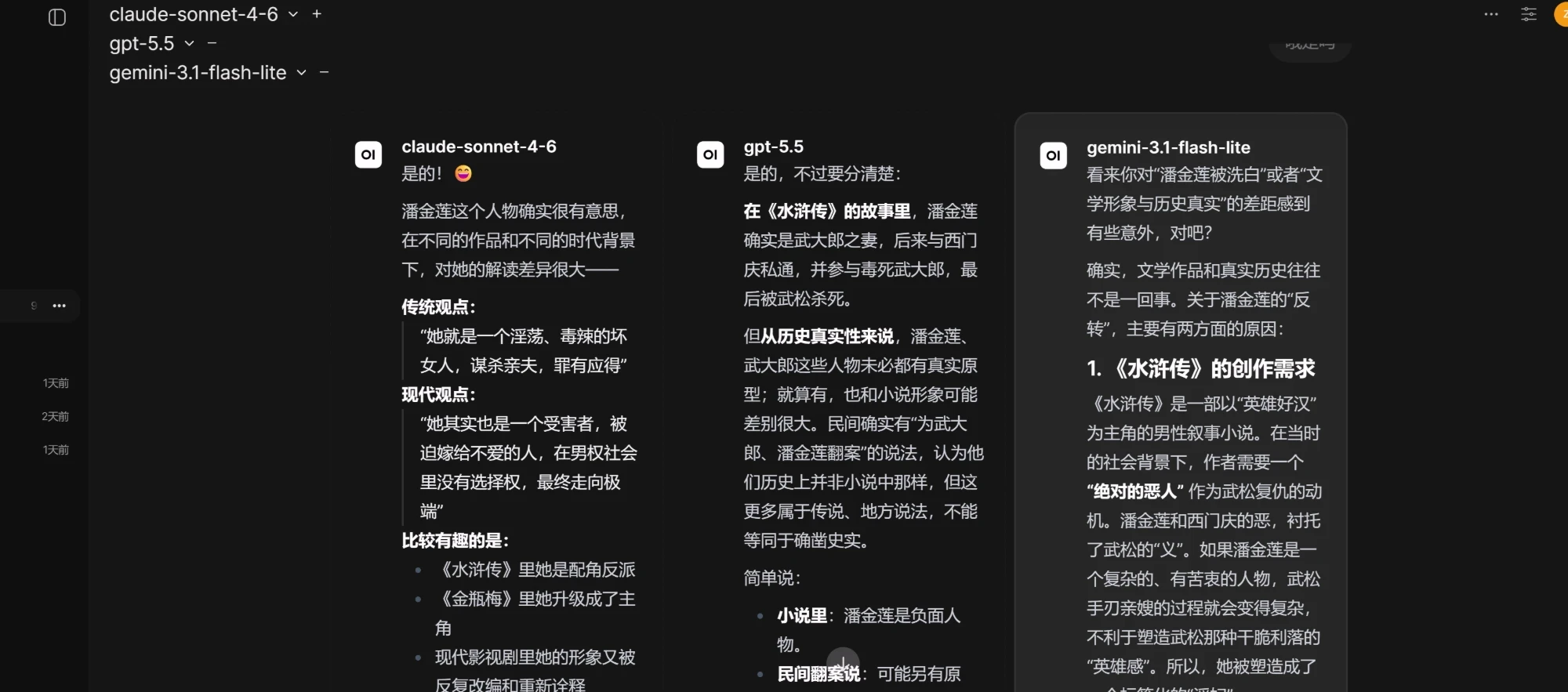
For a long time I'd wanted one very simple thing:
Type one question, and have Claude, GPT, and Gemini all answer it at once, side by side, so I can tell at a glance who did better.
Sounds easy, right? But after trying every ready-made tool out there, not one felt right — they either charged money, wouldn't let me plug in my own key, or simply couldn't show answers side by side.
In the end I just built my own. This post is about how I went from "falling into a big pit" to "standing up a multi-model AI hub the whole family can use — in a single day."
1. First, I went down a dead end
At the start I set my sights on an open-source project called ChatALL — it claimed to let you "chat with all the AIs at once." I cloned it, planning to maintain my own fork.
It was nothing but pitfalls: the Windows build chain threw errors, the packaged app opened to a blank white screen… I stubbornly fixed every one of those bugs, and the app finally opened normally.
But right then I saw something more painful clearly:
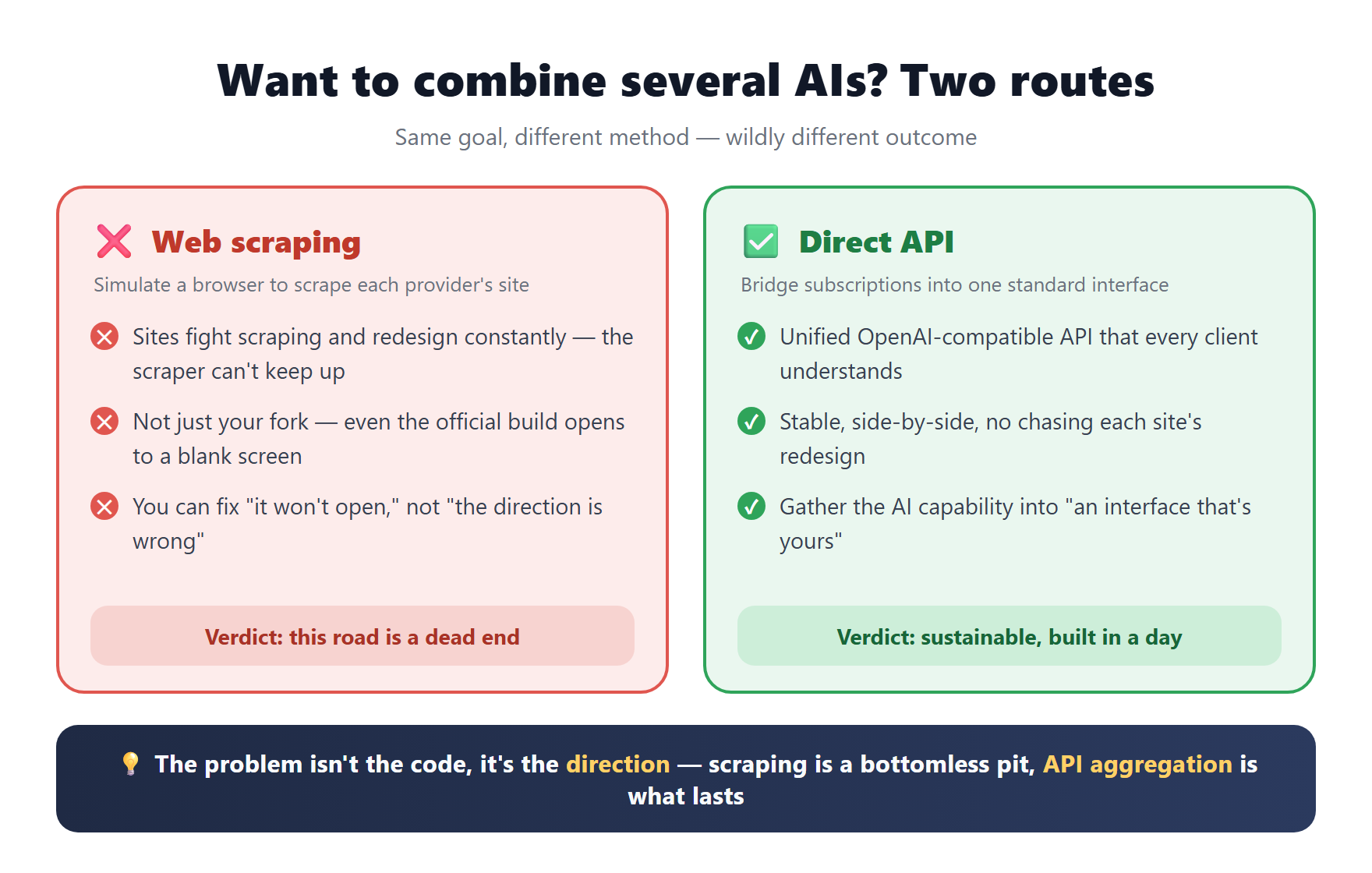
The way it "aggregates all the AIs" is by simulating a browser to scrape each provider's web page — and that road is basically dead today.
The sites fight scraping aggressively and redesign constantly; the scraping logic simply can't keep up. It's not just this project — even the official build opens to a blank screen. What I fixed was only "it won't open"; what I couldn't fix was "the whole approach is wrong."
One line for this part: the problem isn't the code, it's the direction. Web scraping is a bottomless pit.
So I set it down and switched to a completely different idea.
2. A different approach: don't scrape pages, bridge subscriptions
The new idea fits in one sentence:
Stop scraping pages. Instead, unify your "subscriptions" into one standard API, then use a front end that can show answers side by side to call it.
The whole architecture looks like this 👇
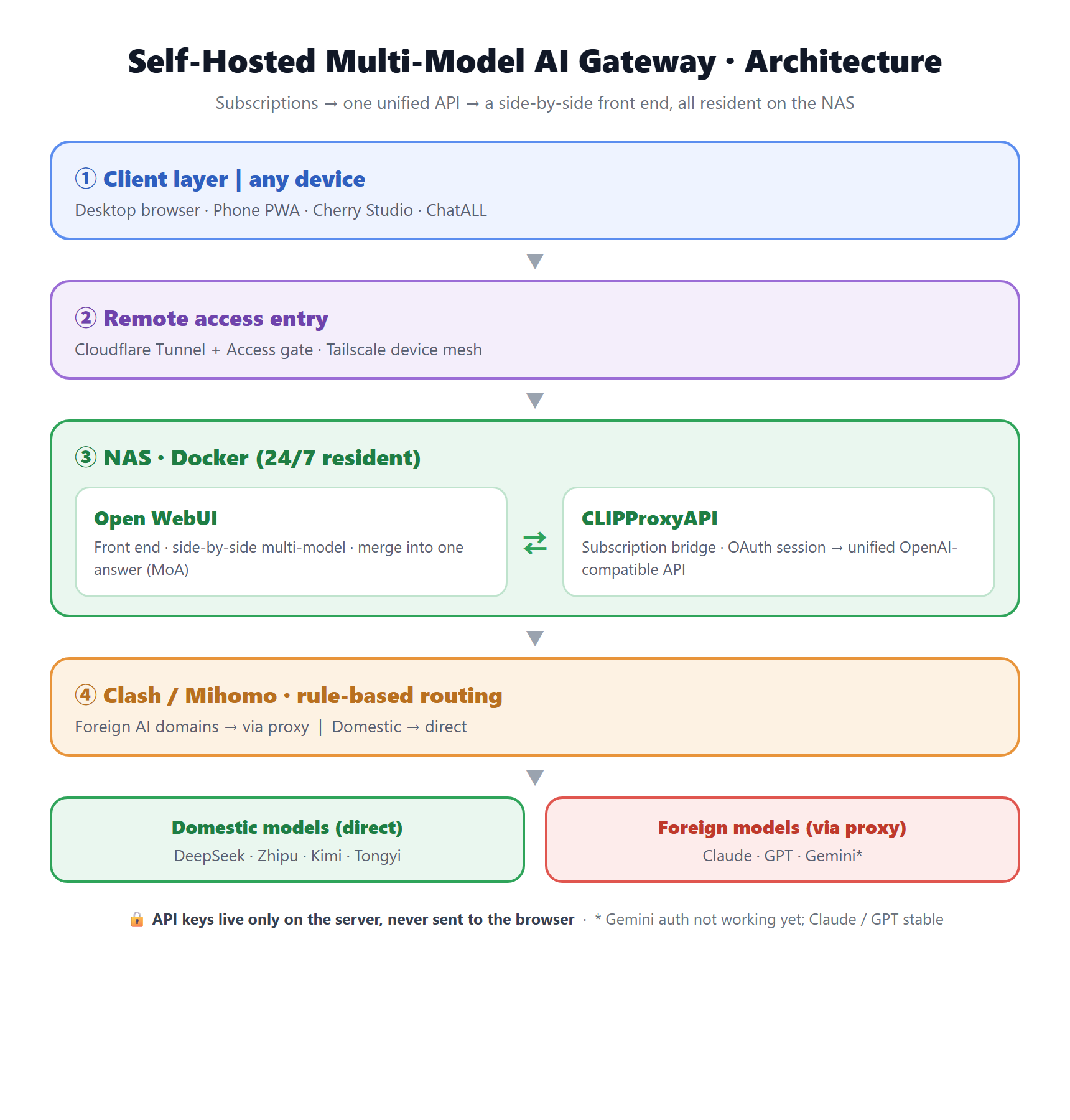
Top to bottom, just four layers:
- Clients: desktop browser, phone, any AI client — anything can connect.
- Entry: lets me reach it securely whether I'm home or out.
- NAS: the two services that do the real work run here, online 24/7.
- Egress: smart routing — what should go through a proxy does, what should connect directly does.
3. Three puzzle pieces
Piece ①: the subscription bridge
This is the soul of the whole thing.
I already pay for and use Claude, GPT, and the rest. There's an open-source tool that can "bridge" the logged-in state of those subscriptions into a single standard interface that every client understands (OpenAI-compatible).
In plain words: the AIs I already pay for get gathered into one interface that's mine.
Piece ②: the front end (Open WebUI)
An interface still has to be good to use. I picked the open-source Open WebUI, because it happens to meet all my requirements:
- ✅ Side-by-side multi-model — fire one question at several models
- ✅ Can merge several answers into one (the industry calls it Mixture-of-Agents)
- ✅ Can connect to any standards-compliant endpoint
- ✅ Data stays entirely in my hands, and it works in the phone browser too
Piece ③: keeping it alive 24/7 (the NAS)
If the first two pieces ran on my Mac, then the moment I close the lid and walk out the door, the whole family is cut off.
So I stuffed them into the NAS and run them with Docker — independent of whether my computer is on, resident 24/7.
4. The most confusing point: which step actually needs a proxy
I have to pull this one out on its own, because too many people get tangled up by it right away:
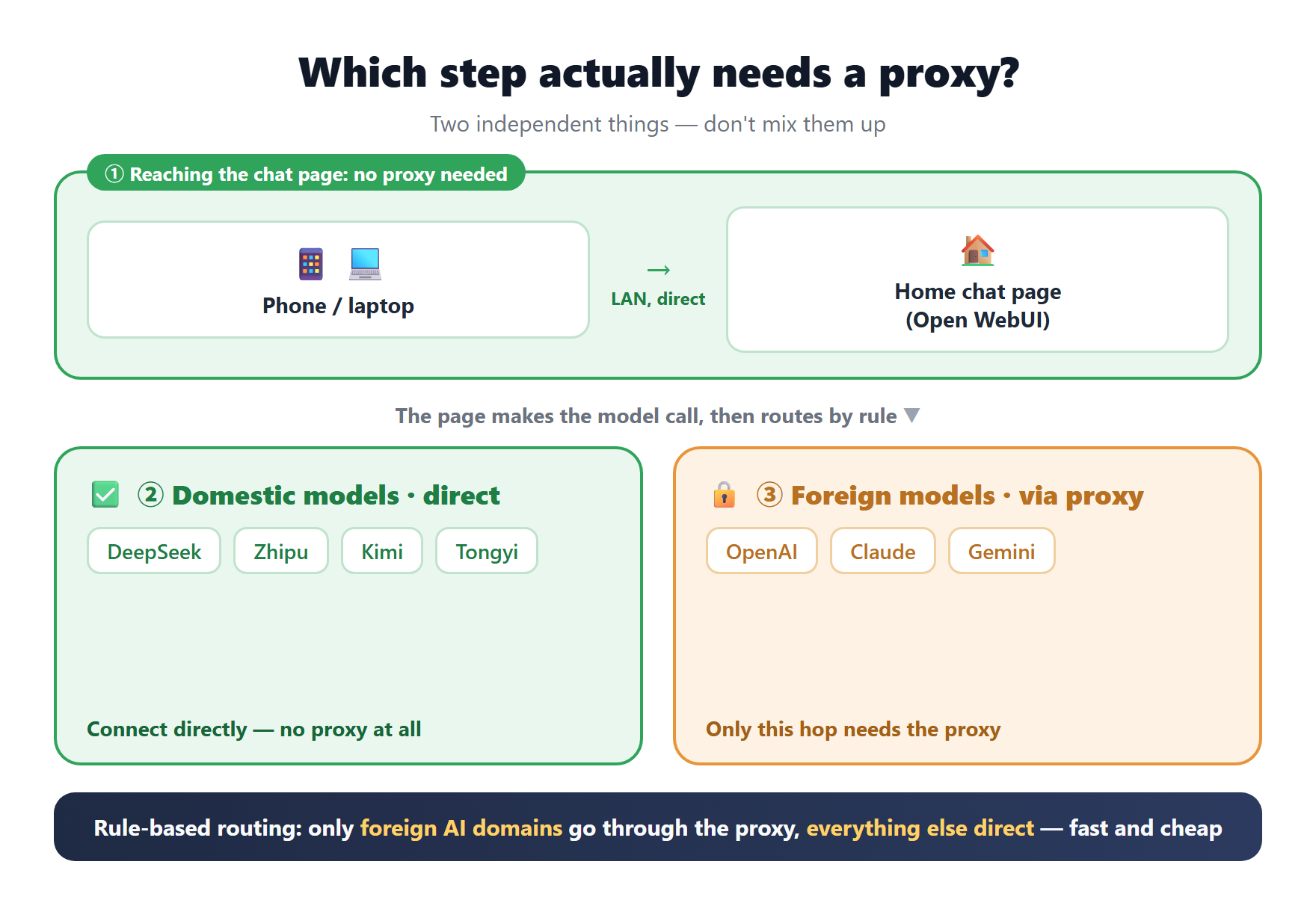
These are two independent things — never mix them up:
- The chat web page itself does not need a proxy. It's just a page running on my home LAN; the phone reaches it over the local network.
- Only the hop that "goes abroad to call foreign models like OpenAI / Claude" needs the proxy. Domestic models (DeepSeek, Zhipu, Kimi, Tongyi) connect directly — no proxy at all.
So the right approach is rule-based routing: only let the foreign AIs' domains go through the proxy, and connect everything else directly. Faster and cheaper.
5. Make it work for the whole family, and on the go: remote access
Working at home isn't enough — I want to open it anywhere, on my phone too. Two tools handle it:
- Tailscale: turns all my devices into one private network, so even when I'm out I can "get back" to the NAS at home.
- Cloudflare Tunnel + Access: gives it a fixed URL as a public entry, plus a gate — only my own email is allowed in, so no one else can even reach the page.
Even better: I already had these proxies and tunnels on my NAS (set up earlier for other services), so I just plugged in — almost zero extra cost.
6. A few real pitfalls (this is the good stuff)
The build wasn't all smooth. A few pitfalls worth noting:
- The service mysteriously crashed in the middle of the night. Digging in, it was a NAS system resource limit (the number of inotify instances) hitting its ceiling. I raised the limit and set it to run on boot, and it held up against the nightly restarts.
- Some proxy nodes couldn't reach the AI endpoints. I changed each node's "health check" address from the default test page to OpenAI's real endpoint — so dead nodes that can't reach the AI get auto-marked dead and auto-avoided.
- The page was a bit slow to open the first time. The front-end bundle is over a hundred MB and has to be downloaded across the border. The fix is simple: "Add to Home Screen" to install it as an app (PWA), so the shell is cached locally and it opens near-instantly afterward.
7. Security: no one can steal my key
What many self-hosters worry about most is leaking the key. My approach:
All API keys live only on the server side, and are never sent to the browser.
Even if someone gets into my web page, they can only "use the models inside the site" — they can't steal the key. Add the email gate and login from before, and that's a double layer of insurance.
8. At the end of the day, what did I actually get
To wrap up. The essence of this thing is:
Take the AI capabilities I already pay for, gather them into one interface that belongs to me, and let any device and any client in the family call multiple large models side by side — built in a day, with almost no new monthly fees.
And a bigger judgment I want to share:
The road of "aggregating multiple AIs by scraping web pages" has reached its end (I proved it firsthand with ChatALL). The truly sustainable direction is API aggregation + a self-hosted front end. Rather than chasing every site's redesign until you're worn out, gather the capabilities into your own interface.
Finally, two honest notes:
- Bridging subscriptions into an API is, strictly speaking, a gray area (it may brush against each provider's terms of service). Internal personal use is fine, but don't abuse it, and definitely don't resell it.
- Right now my setup has Claude and GPT rock-solid, but Gemini's account authorization isn't working yet — no spin: have is have, don't is don't.
If you also want a "self-controlled, side-by-side multi-model" AI hub, this approach is yours to copy. For the specific tool names and pitfall details, let's talk in the comments.